
Engine
Web Audio API engine architecture, lazy singleton, buffer cache, and SSR safety rules.
The sound engine is the single runtime module responsible for decoding audio data and scheduling playback via the Web Audio API. It is the lowest layer of sensory-ui and has no dependency on React.
File: components/ui/sensory-ui/config/engine.ts
Size: ~2 KB gzipped
Why Web Audio API (Not new Audio())
| Concern | new Audio() | Web Audio API |
|---|---|---|
| Latency | High (50–200 ms depending on browser) | Very low (< 10 ms with decoded buffer) |
| Buffer reuse | Impossible: new decode each play | Buffer decoded once, reused ∞ |
| Volume control | .volume property only | Gain node: precise and composable |
| Playback rate | Limited | BufferSourceNode.playbackRate |
| Concurrent plays | Unreliable | Clean: new source node per play |
| SSR safety | Needs guard | Needs guard (same) |
Architecture
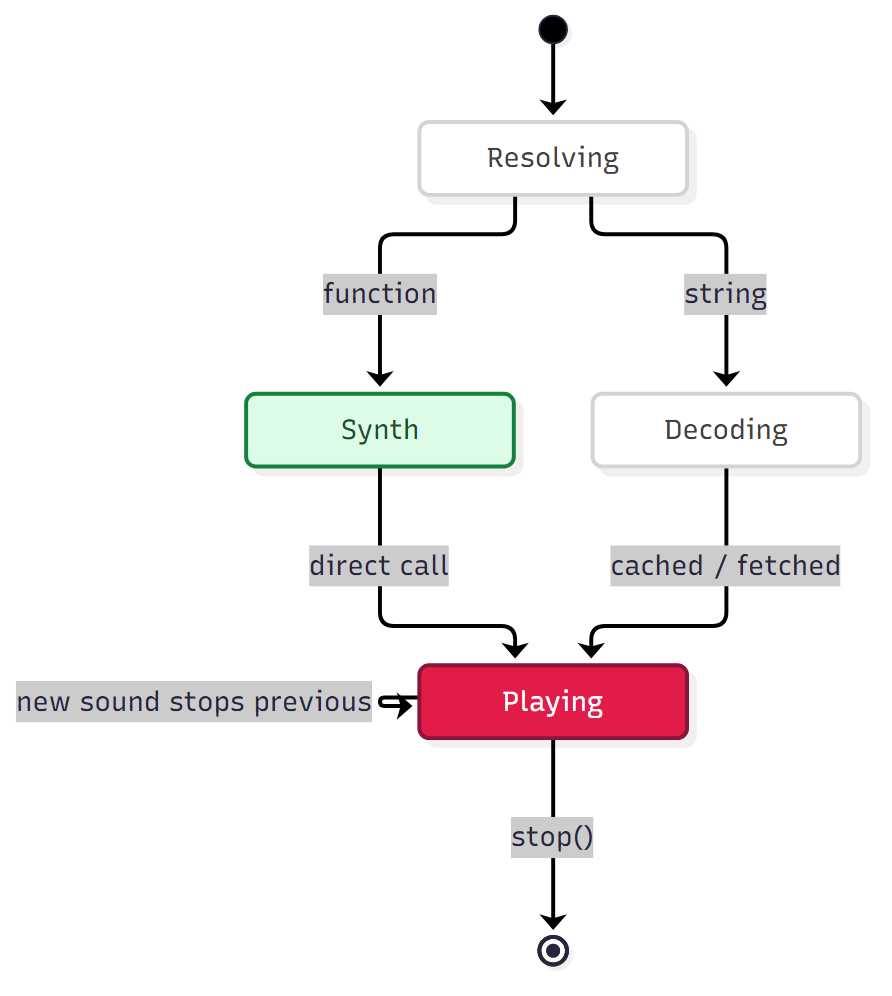
Every playback walks the same path: resolve the role, then take the fast lane (synthesizer) or the decode lane (file):


In steps:
playSound(role, options) is called
resolveRole(role) looks up the source
Reads packRegistry[theme] plus config overrides. Returns a SoundSynthesizer function, a URL string, or null (category disabled).
Synthesizer? Call it directly
call synthesizer(ctx, options): no decoding, no network. Returns SoundPlayback immediately. All 9 built-in packs take this lane.
String? Decode, then play
getAudioContext() → decodeAudioData(source) (base64 decode or fetch, cached by source string) → createBufferSource() → createGain() → source → gain → destination → source.start(0).
Return SoundPlayback { stop() }
The engine tracks the latest playback in activePlayback and stops it when a new sound fires, so rapid clicks never overlap.
Full mermaid diagrams are a planned future upgrade. This flow shows the whole path today.
Lazy Singleton AudioContext
The engine uses a lazy singleton AudioContext, created on first use and reused for all subsequent plays. If the cached context was closed (e.g., after closeAudioContext() or a browser-initiated close), it is recreated so playback can recover.
let audioContext: AudioContext | null = null;

export function getAudioContext(): AudioContext {
  if (audioContext?.state === "closed") {
    audioContext = null;
  }
  if (!audioContext) {
    audioContext = new AudioContext();
  }
  return audioContext;
}
The engine must never be called during server-side rendering. All entry
points must check typeof window === "undefined" as the first line.
SoundSynthesizer
The preferred audio source is a SoundSynthesizer function, called directly with the AudioContext with no decode step needed:
export type SoundSynthesizer = (
  ctx: AudioContext,
  options: PlaySoundOptions,
) => SoundPlayback;

export type SoundSource = SoundSynthesizer | string;
Synthesizers generate sound at call time. This approach:
- Eliminates base64 blobs from the codebase
- Enables rich pack-to-pack variation (noise, oscillator, FM, etc.)
- Is fully SSR-safe (synthesizers only run in the browser)
- Follows the rules in the generating-sounds-with-ai skill
String sources (URLs, base64 data URIs) are still supported via decodeAudioData for custom user overrides.
Buffer Cache
The engine maintains an in-memory decoded buffer cache. The first play of a sound pays the decode cost; every subsequent play is near-instant.
const bufferCache = new Map<string, AudioBuffer>();- Cache key: The audio source string (base64 data URI or URL)
- Built-in sounds: Use the full data URI as the cache key
- Custom overrides: The URL becomes the cache key, so original and overridden sounds can both be cached simultaneously
- Invalidation: Never automatic in production.
clearBufferCache()is available for development tooling or runtime pack switches.
Decode Audio Data
The decodeAudioData function handles both regular URLs and base64 data URIs:
export async function decodeAudioData(source: string): Promise<AudioBuffer> {
  // Handle base64 data URIs directly: no network fetch needed
  if (source.startsWith("data:")) {
    return decodeBase64DataUri(source);
  }

  // Regular URL path
  const cached = bufferCache.get(source);
  if (cached) return cached;

  const ctx = getAudioContext();
  const response = await fetch(source);
  if (!response.ok) {
    throw new Error(
      `[sensory-ui] Failed to fetch audio: ${response.status} ${response.statusText}`,
    );
  }
  const arrayBuffer = await response.arrayBuffer();
  const audioBuffer = await ctx.decodeAudioData(arrayBuffer);

  bufferCache.set(source, audioBuffer);
  return audioBuffer;
}
PlaySound Function
The core playback function accepts either a SoundSynthesizer function or a string audio source:
export async function playSound(
  source: SoundSource,
  options: PlaySoundOptions = {},
): Promise<SoundPlayback> {
  const { volume = 1, playbackRate = 1, onEnd } = options;

  const ctx = getAudioContext();

  // Resume if suspended (autoplay policy)
  if (ctx.state !== "running") {
    await ctx.resume();
  }

  // Cancel the previously playing sound to prevent overlapping audio
  if (activePlayback) {
    try { activePlayback.stop(); } catch { /* ok */ }
    activePlayback = null;
  }

  // If the source is a synthesizer function, call it directly
  if (typeof source === "function") {
    const playback = source(ctx, { volume, playbackRate, onEnd: () => {
      if (activePlayback === playback) activePlayback = null;
      onEnd?.();
    }});
    activePlayback = playback;
    return playback;
  }

  // Otherwise decode the string source and play via buffer
  const buffer = await decodeAudioData(source);
  const bufferSource = ctx.createBufferSource();
  const gain = ctx.createGain();

  bufferSource.buffer = buffer;
  bufferSource.playbackRate.value = playbackRate;
  gain.gain.value = Math.max(0, Math.min(1, volume));

  bufferSource.connect(gain);
  gain.connect(ctx.destination);

  bufferSource.onended = () => {
    if (activePlayback === playback) activePlayback = null;
    onEnd?.();
  };

  bufferSource.start(0);

  const playback: SoundPlayback = {
    stop: () => {
      try { bufferSource.stop(); } catch { /* No-op if already stopped */ }
    },
  };

  activePlayback = playback;
  return playback;
}
Interfaces
export interface PlaySoundOptions {
  /** 0–1. Multiplied with the global master volume from config. */
  volume?: number;
  /** Default 1.0. Values > 1 speed up, < 1 slow down. */
  playbackRate?: number;
  /** Called when the sound finishes playing naturally. */
  onEnd?: () => void;
}

export interface SoundPlayback {
  /** Imperatively stop a playing sound before it ends. */
  stop: () => void;
}
SSR Safety Rules
The engine must never be called during server-side rendering. All entry points to the engine (the provider, primitive components, hooks) must check:
if (typeof window === "undefined") return;This check is cheap and must be the first line in any function that could touch AudioContext, fetch, or atob.
Browser Autoplay Policy
Modern browsers require a user gesture before an AudioContext can produce audio. The engine handles this by calling ctx.resume() before every playback attempt if ctx.state === "suspended".
- The first sound will play correctly if triggered from a user interaction (click, keydown, pointer event).
- Sounds triggered programmatically without a user gesture will be silently blocked. This is by design.
Volume Calculation
finalVolume = masterVolume × localVolumemasterVolume is the provider's config.volume (default 0.35); localVolume is the per-component sound/volume prop or the per-call volume option (default 1). The provider multiplies them before calling the engine, so component volume can only lower the ceiling, never raise it. Buffer playback additionally clamps to 0–1.
What the Engine Does NOT Do
- Does not preload or prefetch any audio on mount
- Does not manage a global
AudioContextexposed outside the module - Does not create any long-lived nodes (no master gain bus, no reverb node)
- Does not trigger any React state updates
- Does not read from
sensory.config.jsdirectly, as config resolution is handled by the caller
Utility Functions
/** Clear the decoded buffer cache. Useful for runtime pack switches. */
export function clearBufferCache(): void {
  bufferCache.clear();
}

/** Soft-close the AudioContext. Call only when no more sounds will be played. */
export async function closeAudioContext(): Promise<void> {
  if (audioContext) {
    await audioContext.close();
    audioContext = null;
    bufferCache.clear();
    activePlayback = null;
  }
}
Size Budget
| Module | Size (gzipped, approx.) |
|---|---|
engine.ts | ~2 KB |
config/ (full core) | ~6 KB |
sounds/ (all 9 packs) | ~16 KB |
| Component wrappers | ~4 KB |
| Total library | ~28 KB |